

- Auto-approve 10 transactions with contract
CasinoDapp, with value between0.05 Laxand1 Laxper 24h period. - Auto-approve transactions to contract
Uniswapv2with value up to1 Lax, ifgas < 44kandgasPrice < 40Gwei. - Auto-approve signing if the data to be signed contains the string
"approve_me". - Auto-approve any requests to list accounts in keystore if the request arrives over IPC
Rule Implementation
The ruleset engine acts as a gatekeeper to the command line interface - it auto-approves any requests that meet the conditions defined in a set of authenticated rule files. This prevents the user from having to manually approve or reject every request - instead they can define common patterns in a rule file and abstract that task away to the ruleset engine. The general architecture is as follows: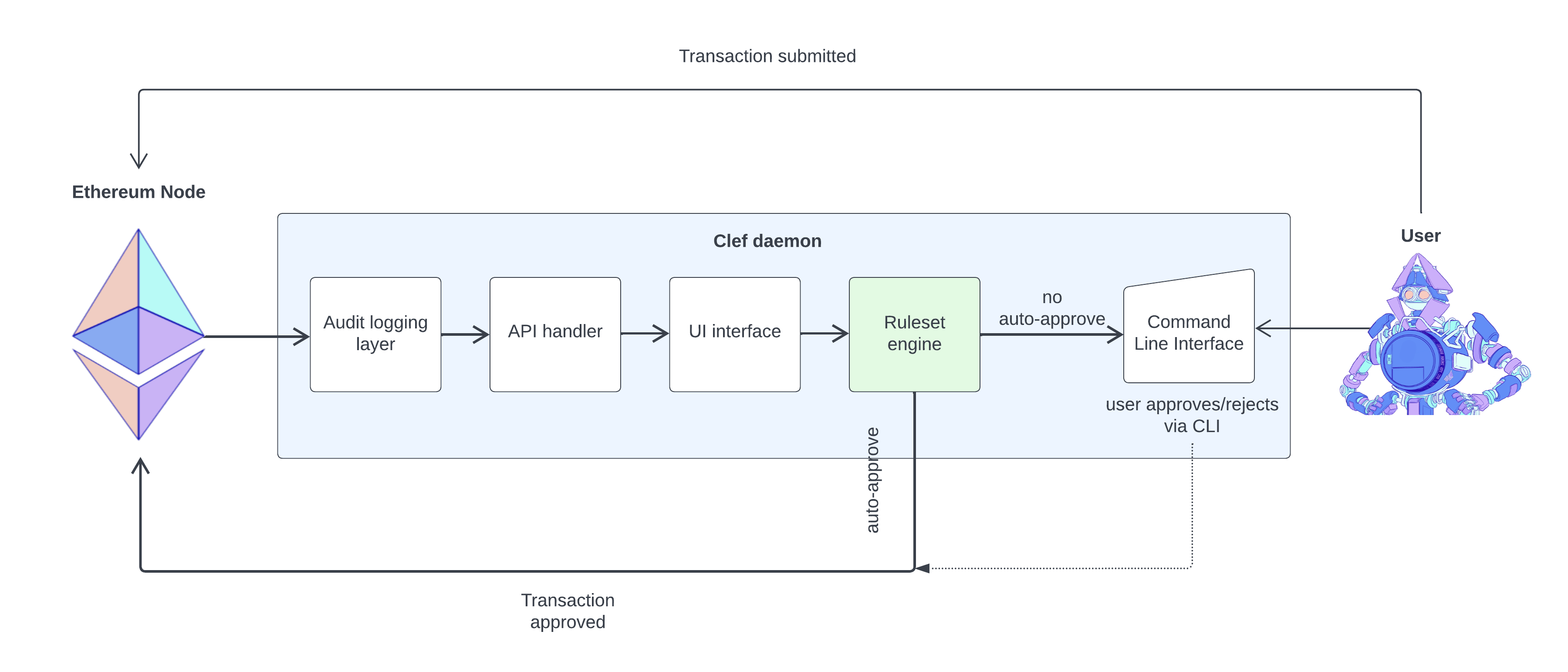 When Clef receives a request, the ruleset engine evaluates a Javascript file for each method defined in the internal UI API docs. For example the code snippet below is an example ruleset that calls the function
 ApproveTx. The call to ApproveTx is invoking the ui_approveTx JSON_RPC API endpoint. Every time an RPC method is invoked the Javascript code is executed in a freshly instantiated virtual machine.
- Request is made to the signer binary using external API
- signer calls the UI - in this case the ruleset engine
- UI evaluates whether the call conforms to rules in an attested rulefile
- Assuming the call returns “Approve”, request is signed.
There are some additional noteworthy implementation details that are important for defining rules correctly in ruleset.js:
- The code in ruleset.js cannot load external Javascript files.
- The Javascript engine can access storage and console
- The only preloaded library in the Javascript environment is bignumber.js version 2.0.3.
- Each invocation is made in a fresh virtual machine meaning data cannot be stored in global variables between invocations.
- Since no global variable storage is available, disk backed storage must be used - rules should not rely on ephemeral data.
- Javascript API parameters are always objects. This ensures parameters are accessed by key to avoid misordering errors.
- Otto VM uses ES5. ES6-specific features (such as Typed Arrays) are not supported.
- The regular expression engine (re2/regexp) in Otto VM is not fully compatible with the ECMA5 specification.
- Strict mode is not supported. “use strict” will parse but it does nothing.
Credential management
The ability to auto-approve transaction requires that the signer has the necessary credentials, i.e. account passwords, to decrypt keyfiles. These are stored encrypted as follows: When the signer is started it generates a seed that is locked with a user specified password. The seed is saved to a location that defaults to$HOME/.clef/masterseed.json. The seed itself is a blob of bytes.
The signer uses the seed to:
- Generate the path where the configuration and credentials data are stored.
$HOME/.clef/790046d38025/config.json$HOME/.clef/790046d38025/credentials.json
- Generate the encryption password for the config and credentials files.
config.json stores the hashes of any attested rulesets. credentials.json stores encrypted account passwords. The masterseed is required to decrypt these files. The decrypted account passwords can then be used to decrypt keyfiles.